 Iqbal Abdullah
Receive Custom Domain Email with Cloudflare Workers: A Serverless Webhook Guide
How to receive KaiMail webhooks on Cloudflare Workers. Build a maintenance-free email automation pipeline that turns custom domain email into JSON at the edge.
The need to "do something when an email arrives" is older than most cloud services. Order confirmations that should update inventory. Support inquiries that should become tickets. Invoices that need feeding into accounting systems. The wall that stops most people is not the code — it is the mail server. Standing up a server just to receive email, patching the OS, rotating certificates, fighting spam. Many look at that stack and decide the automation is not worth the weekend it will cost them.
This article is for people who want to receive and process email without managing a mail server. Cloudflare Workers makes that possible with a few lines of code, zero maintenance, and a generous free tier.
To be specific, we will use KaiMail's webhook delivery on the receiving side. When a message hits your custom domain, KaiMail forwards it as a real-time JSON POST to a Cloudflare Worker you deploy. No polling, no servers, no certificate management.
The Idea: Serverless Email Reception
Traditional email automation usually falls into one of two traps.
The first is running your own mail server. Install Postfix or Dovecot, hook a script into the delivery path, and you have unlimited flexibility. You also have unlimited responsibility: spam filtering, authentication setup, certificate renewal, OS updates. For a small project the overhead is absurd.
The second is polling a mailbox. Hit the Gmail or Outlook API every five minutes and ask if anything new has arrived. No server needed, but no real-time behavior either. Messages sit unprocessed for minutes, and you have to nurse API rate limits.
Webhooks avoid both problems. The moment a message lands, an HTTP POST fires to a URL you control. Real-time, no server management, no polling delay. The catch is that you still need an endpoint to receive that POST. That is where Cloudflare Workers comes in.
Cloudflare Workers runs JavaScript or TypeScript on Cloudflare's edge network. Unlike older serverless platforms such as AWS Lambda, cold starts are barely a concern. Your code executes across 250-plus data centers worldwide, so latency stays low no matter where the request originates. (If you are unfamiliar with the term, cold start refers to the delay when a serverless platform has to spin up a fresh runtime instance for your code.)
Cloudflare Workers Pricing and Limits
For personal projects and small automation pipelines, the free plan is enough. The pricing structure as of July 2026 is below.
| Item | Free plan | Paid plan ($5/month and up) |
|---|---|---|
| Requests | 100,000/day | 10 million/month included, then $0.30 per million |
| CPU time | 10 ms/invocation | 30 million ms/month included, then $0.02 per million |
| Execution time | 10 ms | Up to 5 minutes (default 30 seconds) |
| Concurrent executions | Unlimited | Unlimited |
Webhook handling is lightweight: parse JSON, maybe call an external API. A few milliseconds per message. The free tier of 100,000 requests per day covers almost any personal use case. Even at scale, the paid floor is $5 per month with 10 million requests included.
How Webhook Reception Works on Workers
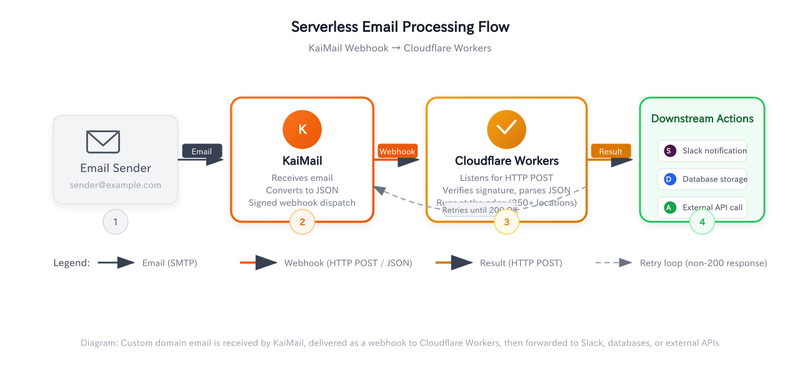
Cloudflare Workers invokes a fetch event handler whenever it receives an HTTP request. KaiMail's webhook POSTs signed JSON to a URL you configure. Your Worker sits at that URL, verifies the payload, and does whatever you need.
The pipeline looks like this:
- Register your custom domain in the KaiMail dashboard.
- Set the mailbox forwarding destination to a webhook URL — specifically, the URL issued after you deploy your Cloudflare Worker (for example,
https://<your-worker>.workers.dev), which you paste into the KaiMail dashboard for the mailbox you want to automate. - Deploy a Worker that listens on that URL.
- Receive and process the JSON payload.
The payload includes sender, recipient, subject, body text, HTML, and attachment metadata. Signature verification is supported, but we will start with the smallest working version.
Minimal Worker Code
Start without signature verification. Get it working, then harden it.
// index.ts
export default {
  async fetch(request: Request): Promise<Response> {
    // Only accept POST
    if (request.method !== 'POST') {
      return new Response('Method not allowed', { status: 405 });
    }

    // Parse the JSON payload from KaiMail
    const payload = await request.json();

    // Extract fields
    const { from, to, subject, text, html } = payload;

    // Do your real work here
    console.log(`Received: ${subject} (${from} → ${to})`);

    // Return 200 so KaiMail does not retry
    return new Response('OK', { status: 200 });
  },
};
That is the entire application. No framework installation, no server startup. Paste the code into the Cloudflare dashboard or deploy with Wrangler, and within seconds your endpoint is live on the edge.
Deploying via Wrangler:
# Initialize the project
npx wrangler init kaimail-webhook --template hello-world

# Replace the code and deploy
cd kaimail-webhook
npx wrangler deploy
After deployment, copy the Workers URL (https://<your-worker>.workers.dev) into KaiMail's webhook settings for your mailbox. Messages will start flowing immediately.
Three Practical Processing Patterns
Receiving a webhook and returning "OK" is only the beginning. Below are three patterns that actually do something useful.
Pattern 1: Filter by Sender Domain
export default {
  async fetch(request: Request, env: Env): Promise<Response> {
    if (request.method !== 'POST') {
      return new Response('Method not allowed', { status: 405 });
    }

    const payload = await request.json();
    const { from, subject } = payload;

    // Only process messages from a specific domain
    if (!from.endsWith('@example.com')) {
      return new Response('Ignored', { status: 200 });
    }

    // Only store invoices
    if (subject.includes('Invoice')) {
      await env.KV.put(`invoice:${Date.now()}`, JSON.stringify({
        from,
        subject,
        receivedAt: new Date().toISOString(),
      }));
    }

    return new Response('OK', { status: 200 });
  },
};
Cloudflare KV is a key-value store. You can stash invoice metadata for later batch export, queue messages for downstream workers, or build simple stateful pipelines. The free tier allows 100,000 reads and writes per day.
Pattern 2: Forward to an External API
export default {
  async fetch(request: Request, env: Env): Promise<Response> {
    if (request.method !== 'POST') {
      return new Response('Method not allowed', { status: 405 });
    }

    const payload = await request.json();

    // Notify Slack
    await fetch(env.SLACK_WEBHOOK_URL, {
      method: 'POST',
      headers: { 'Content-Type': 'application/json' },
      body: JSON.stringify({
        text: `New email: ${payload.subject}\nFrom: ${payload.from}`,
      }),
    });

    return new Response('OK', { status: 200 });
  },
};
Outbound requests from a Worker to Slack, Discord, LINE, your own API, or any other service incur no extra cost. Subrequests do not count against your request quota.
Pattern 3: Verify the Signature
In production, always verify the webhook signature. KaiMail signs every payload so you can confirm it genuinely came from them and was not tampered with in transit.
import { createHmac } from 'crypto';

async function verifySignature(
  payload: string,
  signature: string,
  secret: string
): Promise<boolean> {
  const expected = createHmac('sha256', secret)
    .update(payload)
    .digest('hex');
  return signature === `sha256=${expected}`;
}

export default {
  async fetch(request: Request, env: Env): Promise<Response> {
    if (request.method !== 'POST') {
      return new Response('Method not allowed', { status: 405 });
    }

    const body = await request.text();
    const signature = request.headers.get('X-KaiMail-Signature') || '';

    if (!await verifySignature(body, signature, env.KAIMAIL_WEBHOOK_SECRET)) {
      return new Response('Invalid signature', { status: 401 });
    }

    const payload = JSON.parse(body);
    console.log(`Verified: ${payload.subject}`);

    return new Response('OK', { status: 200 });
  },
};
Without signature verification, anyone who discovers your endpoint URL can POST fake email data to it. Security should not be an afterthought, but it is realistic to confirm basic operation first and then add verification before going live.
Troubleshooting
A few traps appear once you start building.
Timeouts
Cloudflare Workers enforces a default execution limit of 30 seconds. KaiMail retries webhooks until it receives a 200 OK. If your handler makes slow outbound API calls or downloads large attachments, you can hit that ceiling.
There are two fixes. One is to decouple receipt from processing using Cloudflare Queues or Durable Objects. The Worker immediately returns 200, and the heavy work happens asynchronously. The other is to raise the execution limit — up to 5 minutes for HTTP requests, or 15 minutes for Cron Triggers and Queue Consumers.
In practice, most email webhook handlers finish in well under a second. If you are brushing against 30 seconds, rethink the architecture rather than the limit.
Attachments add latency
When an email includes attachments, KaiMail's JSON payload includes download URLs for those files. Large attachments take time to fetch. If your Worker tries to download a 50 MB file synchronously inside the request handler, you will likely time out. Either stream the download asynchronously or move attachment handling to a background queue.
Debugging is harder than local development
You cannot console.log to a terminal you are staring at. Worker logs appear in the Cloudflare dashboard or via the Wrangler CLI:
# Stream logs in real time
npx wrangler tail
Local development works with wrangler dev, but KaiMail cannot deliver to localhost. Use a tunnel service like ngrok, or use KaiMail's test webhook feature to send synthetic payloads without waiting for real email.
JSON parse failures
Occasionally a message body contains malformed characters that break request.json(). Wrap the parse in a try/catch and return 400 so KaiMail knows the payload was rejected rather than lost.
let payload;
try {
  payload = await request.json();
} catch (e) {
  return new Response('Invalid JSON', { status: 400 });
}
KaiMail encodes the webhook payload as UTF-8, but the original email body may carry its own encoding. Normal text messages are fine; exotic encodings can produce unexpected characters. This is a limitation of email standards, not KaiMail.
How the Architectures Compare
| Concern | Self-hosted (Postfix + Python) | Local dev (Flask + ngrok) | Cloudflare Workers |
|---|---|---|---|
| Server management | Required (OS, patches, certs) | None (dev machine) | None |
| Internet exposure | Required | Needs ngrok tunnel | Automatic on deploy |
| Scaling | Manual (add servers) | None (single process) | Automatic (edge) |
| Cold start | None (always on) | None | Near-zero |
| Cost | VPS fee ($5+/month) | Free (dev only) | Free to $5/month |
| SSL certificates | Manual renewal | Handled by ngrok | Handled by Cloudflare |
| Signature verification | Custom code | Custom code | Custom code (same logic) |
Every option involves trade-offs. Self-hosting gives maximum freedom at maximum cost in time. Flask + ngrok is perfect for prototyping but not for production. Workers is production-ready and low-maintenance, but it locks you into Cloudflare's platform.
My own view is that most "I want to react to email" use cases are fully satisfied by Workers. The time you would spend maintaining a mail server is better spent on the actual problem you are trying to solve.
To wrap it up, this is what the flow of data looks like from a bird's eye point of view:
Summary
Using KaiMail webhooks with Cloudflare Workers gives you a maintenance-free email automation base. The minimal deployment is a few lines of code and takes seconds to push live. The first 100,000 requests per day are free.
The recommended order is: confirm basic operation, add signature verification, then layer on real processing logic (external API calls, KV storage, queue publishing). Once the base is in place, adding new automation flows is just adding code to the same endpoint.
The real benefit of serverless is freedom from infrastructure. You should not lose a weekend to mail server administration just because you want to process incoming email. Write the code, deploy it, and let Cloudflare handle the rest.
If you prefer a no-code approach, we also have a Zapier integration guide that achieves similar connections without writing code. Cloudflare Workers offers flexibility for developers; Zapier offers speed for everyone else.
For the full webhook payload schema and signature verification specification, see the KaiMail Webhook Integration Guide. For the complete Cloudflare Workers API reference, see the Cloudflare Developers documentation.