 The Postmaster
The Chain of Custody: How ARC Keeps Forwarded Email Trustworthy
ARC is email's chain-of-custody stamp. When a message is forwarded, ARC proves who handled it and that it arrived intact at every step.

In my years at the post office, we had a rule for registered mail: every handler had to sign the transit card — not just the sender and the final recipient, but everyone in between. The sorting center, the transit hub, the regional office. When a parcel arrived after a long journey, you could trace exactly where it had been and confirm that nobody had tampered with it along the way.
Email authentication worked reasonably well until forwarding entered the picture. And that is exactly what ARC — or Authenticated Received Chain — was designed to solve.
A Brief History of ARC
When DMARC became widely adopted around 2012–2014, it introduced a problem that nobody had fully anticipated. DMARC works by checking that a message's DKIM signature is valid and that the sending IP matches the domain's SPF record. For direct sending, this works beautifully. But the moment a message is forwarded — by a mailing list, a corporate mail gateway, or an email alias service like KaiMail — the SPF check breaks because the forwarding server's IP is not listed in the original sender's SPF record. Worse, some forwarders modify the message body or headers, which breaks the DKIM signature too.
Receiving servers faced an impossible choice: accept forwarded mail and risk spam, or honor DMARC strictly and reject legitimate messages.
The ARC Working Group — made up of engineers from Google, Microsoft, Yahoo, Linkedin, and others — began work on a solution around 2015. After several years of drafts and real-world testing, RFC 8617 was published in July 2019, formally standardizing ARC. Google began honoring ARC headers in Gmail that same year. Microsoft followed with Exchange Online support. Today, ARC is a recognized best practice for any service that forwards email on behalf of others — which is precisely what KaiMail does.
The Chain-of-Custody Stamp: What ARC Actually Does
Think of ARC as that transit card from registered mail. When KaiMail receives a message from a sender and forwards it to your inbox, KaiMail adds three special headers to the message — a set of stamps that say:
- "When I received this message, here is what the authentication results looked like."
- "Here is my own cryptographic signature over the message as I received it."
- "Here is a seal covering my entire set of stamps, so nobody can alter them."
If another forwarder receives that message and forwards it again, they add their own set of stamps at a higher instance number. The final receiving server — Gmail, Outlook, wherever the message lands — can read the entire chain, verify each seal in sequence, and decide whether the original message was authentic before the forwarding happened.
The three ARC headers are:
ARC-Authentication-Results (AAR) — Records the SPF, DKIM, and DMARC results that the forwarder observed when it received the message. Tagged with i=1 for the first hop, i=2 for the second, and so on.
ARC-Message-Signature (AMS) — A DKIM-style signature over the message headers and body as they existed at this hop. This is the cryptographic proof of the message's state at the time of forwarding.
ARC-Seal (AS) — A signature that covers all previous ARC header sets, in sequence. It ensures nobody can remove, reorder, or forge earlier stamps in the chain.
Together, they form an unbroken chain of custody from the original sender to the final destination.
The Three ARC Headers Up Close
Here is what a typical set of ARC headers looks like after KaiMail processes a message (simplified for readability):
ARC-Authentication-Results: i=1; kaimail.net;
  dkim=pass header.d=sender-domain.com;
  spf=pass smtp.mailfrom=sender-domain.com;
  dmarc=pass action=none header.from=sender-domain.com

ARC-Message-Signature: i=1; a=rsa-sha256; c=relaxed/relaxed;
  d=kaimail.net; s=arc2024;
  h=from:to:subject:date:message-id:mime-version:content-type;
  bh=<body hash>;
  b=<signature>

ARC-Seal: i=1; a=rsa-sha256; cv=none;
  d=kaimail.net; s=arc2024;
  b=<seal signature>
The cv= field in the ARC-Seal is worth noting. For the first hop it is always none. For subsequent hops it will be pass (all prior seals verified) or fail (something broke the chain). A fail does not necessarily mean the message is spam — it means someone in the chain did not support ARC, or modified the message in a way that was not anticipated.
How ARC Signatures Are Calculated: Python Code
This one takes a second cup of tea, but let us walk through it together.
The standard Python library for working with DKIM and ARC is dkimpy. Install it first:
pip install dkimpy authheaders
Signing a Message with ARC Headers
import dkim
import authheaders

# Suppose you are a forwarder. You have received a raw email message
# and you want to add ARC headers before forwarding it on.

with open("received_message.eml", "rb") as f:
    raw_message = f.read()

# The authentication results you observed when you received the message.
# In production, these come from your MTA's SPF/DKIM/DMARC checks.
auth_results = (
    "i=1; kaimail.net; "
    "dkim=pass header.d=example.com; "
    "spf=pass smtp.mailfrom=example.com; "
    "dmarc=pass action=none header.from=example.com"
)

# Your ARC signing key (RSA private key, PEM format)
with open("arc_private_key.pem", "rb") as f:
    private_key = f.read()

# Sign the message with ARC headers
# Parameters: message, authserv_id, selector, domain, privkey
signed_message = authheaders.sign_message(
    message=raw_message,
    authserv_id="kaimail.net",
    selector=b"arc2024",
    domain=b"kaimail.net",
    privkey=private_key,
    sig=b"ARC",
    auth_results=auth_results.encode()
)

print(signed_message.decode())
Verifying an ARC Chain
import authheaders

with open("forwarded_message.eml", "rb") as f:
    raw_message = f.read()

# verify_message returns (chain_validation_status, result_list)
# chain_validation_status: "none", "pass", or "fail"
cv, results = authheaders.verify_arc_chain(raw_message)

print(f"ARC chain status: {cv}")
for r in results:
    print(f"  Instance {r['instance']}: seal={r['seal']}, ams={r['ams']}")
A cv=pass means every seal in the chain verified correctly. The receiving server can now use this to make an informed trust decision even if SPF and DKIM themselves have broken down due to forwarding.
Inspecting the ARC Headers Manually
If you want to inspect the raw headers without a full library, here is a minimal parser:
import re
from email import message_from_bytes

with open("forwarded_message.eml", "rb") as f:
    msg = message_from_bytes(f.read())

arc_headers = {
    "ARC-Authentication-Results": [],
    "ARC-Message-Signature": [],
    "ARC-Seal": [],
}

for header_name in arc_headers:
    values = msg.get_all(header_name, [])
    for v in values:
        # Extract the instance number
        instance_match = re.search(r'i=(\d+)', v)
        instance = int(instance_match.group(1)) if instance_match else 0
        arc_headers[header_name].append((instance, v.strip()))

# Print sorted by instance number
for header_name, entries in arc_headers.items():
    for i, val in sorted(entries):
        print(f"\n[{header_name}] i={i}")
        print(val[:200], "..." if len(val) > 200 else "")
Testing Whether KaiMail's ARC Signature Is Correct
There are several ways to verify that the ARC headers KaiMail adds to your forwarded messages are valid.
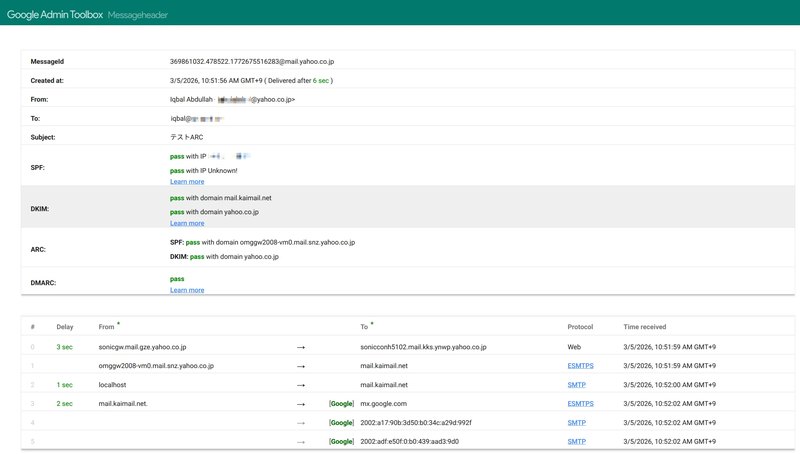
Method 1 — Google Admin Toolbox (No Code Required)
- In your Gmail inbox, open a message that arrived via KaiMail forwarding.
- Click the three-dot menu → Show original.
- Click Copy to clipboard, then go to toolbox.googleapps.com/apps/messageheader/.
- Paste the raw message. Look for the
ARC-SealandARC-Authentication-Resultsentries and confirmcv=noneorcv=pass.
Method 2 — MXToolbox Header Analyzer
Paste the raw headers into mxtoolbox.com/EmailHeaders.aspx. Scroll to the ARC section. MXToolbox will flag any malformed or unverifiable ARC headers.
Method 3 — Python Verification Script
Save a message you received via KaiMail as a .eml file (in Gmail: Show original → Download original), then run:
import authheaders
import sys

eml_path = sys.argv[1]  # e.g. python verify_arc.py my_message.eml

with open(eml_path, "rb") as f:
    raw = f.read()

cv, results = authheaders.verify_arc_chain(raw)

print(f"\n=== ARC Chain Verification ===")
print(f"Overall chain validity: {cv.upper()}")
print()

for r in results:
    i = r.get("instance", "?")
    seal_status = r.get("seal", "unknown")
    ams_status = r.get("ams", "unknown")
    domain = r.get("domain", "unknown")
    print(f"  Hop {i} ({domain}):")
    print(f"    ARC-Seal:             {seal_status}")
    print(f"    ARC-Message-Signature:{ams_status}")
Expected output for a healthy KaiMail-forwarded message:
=== ARC Chain Verification ===
Overall chain validity: PASS

  Hop 1 (kaimail.net):
    ARC-Seal:              pass
    ARC-Message-Signature: pass
Method 4 — OpenARC Command-Line Tool
If you have openarc installed on a Linux machine:
# Install
sudo apt install openarc

# Extract headers from a saved message and verify
openarc -v -f forwarded_message.eml
Look for ARC verification results: pass in the output.
What to Do If Verification Fails
If you see cv=fail or a signature mismatch, it most commonly means one of the following happened downstream of KaiMail: another forwarder modified the message without updating the ARC chain, or the message was processed by a filter that altered the headers. This is not necessarily a sign that KaiMail did anything wrong — the chain records where the break occurred.
Why KaiMail Uses ARC
As an email forwarding service, KaiMail sits precisely in the middle of the delivery chain — the position where DMARC checks are most likely to fail without ARC in place. By adding ARC headers to every forwarded message, KaiMail tells the final receiving server: "I received this message, I checked it, and here is what I found. You can trust my assessment."
Large receivers like Gmail and Outlook do take ARC into account when making spam and deliverability decisions, especially for messages coming from known, trusted forwarders. ARC is one of the reasons your forwarded mail arrives reliably in the inbox rather than disappearing quietly into a spam folder.
A Closing Word
In postal work, the chain of custody was never about distrust — it was about accountability. Every handler signed because every handler cared that the letter arrived safely. ARC works the same way. Each forwarder vouches for what it saw, and the recipient can trace the entire journey.
Take your time reading through those headers. There is a lot of quiet craftsmanship in there.